Short answer: Shares and reposts travel differently. A share sends your post to one person by DM or Story; a repost shows it to the reposter's followers and keeps it on their Reposts tab. Buying both covers private and public spread. On InstaBoost, 100 shares cost ₹2 and 10 reposts cost ₹8, so a starter combo costs ₹10, paid as two UPI checkouts.
How shares and reposts spread a post differently
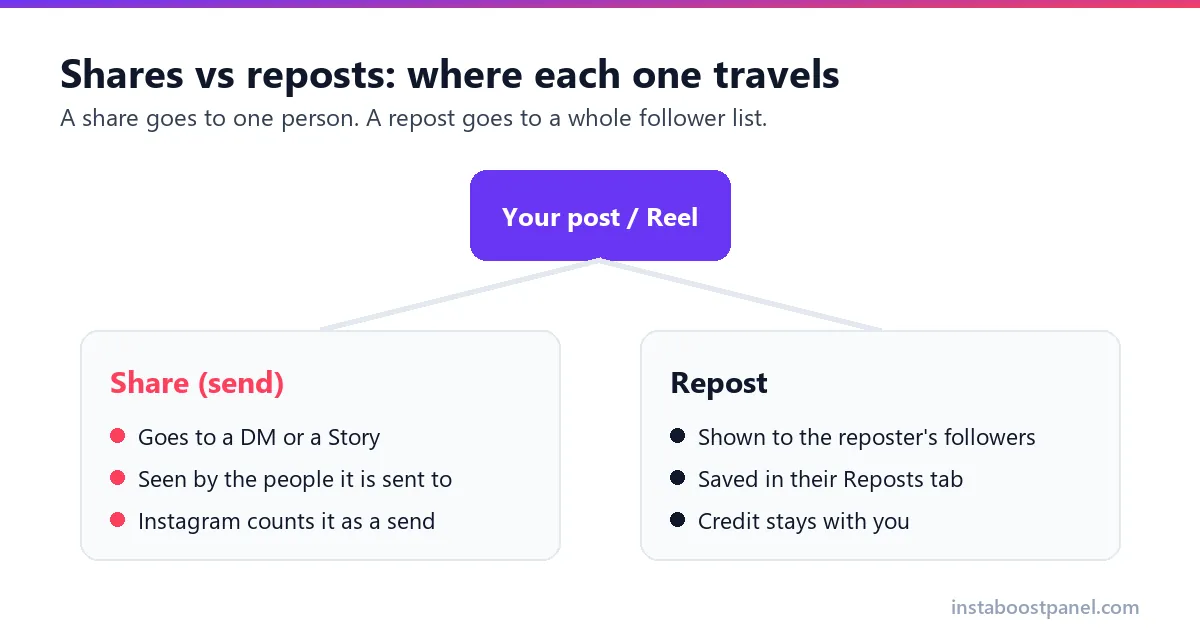
A share, which Instagram also calls a send, goes to specific people: a friend in DMs, a group chat or a Story. It is private, and the post owner sees only a total. Mosseri named sends as one of the three main signals in January 2025, and said they matter slightly more for people who do not follow you (Social Media Today).
A repost is public. Since Instagram rolled out its Repost button globally in August 2025, a repost is shown to the reposter's followers and kept on a Reposts tab on the reposter's profile, with credit to you (GSMArena). Only public posts can be reposted, and public accounts can turn reposts off.
Put simply, shares and reposts answer two different questions. Shares answer 'would someone send this to a friend?'; reposts answer 'would someone put this on their own profile?'. A post that earns both is one people want to talk about and be seen with, which is why creators often look at the two together.
Why pair shares and reposts instead of buying one?
Our reasoning, offered as an opinion: a post that people genuinely love tends to collect both kinds of spread at once. Some people send it to a friend, a few repost it to their own followers. A post with thousands of sends and zero reposts, or the other way round, can look one-sided.
Pairing the two also spreads your budget across a cheap action and an expensive one. Shares at ₹17 per 1,000 let you add volume for very little, while a small number of reposts at ₹750 per 1,000 adds the public element.
If your post is a guide or a list, saves may be a better partner than reposts. We compare that option further down.
There is a practical side too. Shares need nothing from your settings except a public post, while reposts also need reposting switched on. Ordering shares first lets you confirm the link and the account are fine for a couple of rupees, before you spend more on reposts.
Combo budgets from ₹10 to ₹500
These combos use the order form's own prices (8 October 2026). The total is simply the two checkout amounts added together.
Notice where the money goes. In every combo the reposts cost more than the shares, even though there are far fewer of them, because one repost costs about 44 times as much as one share. If you want to keep a combo cheap, trim the reposts, not the shares.
The Starter combo is the one to use for a first test. At ₹10 it is cheap enough to try on a single post, and it shows you whether both services land on that post before you scale up.
| Combo | Shares | Reposts | Shares cost | Reposts cost | Total |
|---|---|---|---|---|---|
| Starter | 100 | 10 | ₹2 | ₹8 | ₹10 |
| Small | 500 | 20 | ₹9 | ₹15 | ₹24 |
| Standard | 1,000 | 100 | ₹17 | ₹75 | ₹92 |
| Large | 5,000 | 200 | ₹85 | ₹150 | ₹235 |
| Launch | 10,000 | 400 | ₹170 | ₹300 | ₹470 |
Start with 100 shares for ₹2 →
What ratio of shares to reposts makes sense?
There is no official ratio, and we have not found a public dataset that gives one. Our rule of thumb is to keep reposts much rarer than shares, because a repost asks more of a person than a quick send: it puts your post on their own profile.
In the combos above, reposts are between 4%% and 10%% of the share count. Stay in that kind of range, and keep both in proportion to the post's views. A Reel with 800 views and 2,000 shares and reposts will look wrong to anyone who checks.
A simple way to apply this: decide the share count from the post's views first, then set reposts at roughly a twentieth to a tenth of that. If the post later earns more genuine views, you can add a second small round of both instead of one oversized order up front.
How to order both: two quick checkouts
The order form takes one service per payment, so a combo is two short orders on the same post. Placing them a few minutes apart is fine; there is no need to wait for the first order to finish before starting the second.
Use the exact same link for both orders. Copy it once from Instagram's Share menu and paste it twice, rather than copying it again from the browser, so both orders point at the same post.
- Copy the post or Reel link from Instagram's Share menu and check that the account is public and reposts are switched on.
- Order the shares: choose Shares, paste the link, enter the quantity and pay by UPI.
- Order the reposts: open the reposts order form, paste the same link, enter the quantity and pay again.
- Save both order IDs together, and screenshot the post's Insights before and after, as in our delivery-check guide.
Shares and reposts price list
If you would rather build your own combo, here are the most common pack sizes for each service. Shares start at 100, so the smallest cells in the shares column say 'below minimum'.
To build a custom combo, pick the reposts first, because they decide most of the cost, then add shares on top. For example, 50 reposts (₹38) plus 1,000 shares (₹17) comes to ₹55, a middle option between the Small and Standard combos.
| Quantity | Shares | Reposts |
|---|---|---|
| 10 | below minimum | ₹8 |
| 50 | below minimum | ₹38 |
| 100 | ₹2 | ₹75 |
| 500 | ₹9 | ₹375 |
| 1,000 | ₹17 | ₹750 |
Shares and reposts, or shares and saves?
Shares and reposts suit posts that travel: Reels, memes, announcements and anything people would put on their own profile. Shares and saves suit posts that people keep: tutorials, checklists, recipes and price lists.
We already cover the second pairing in our shares and saves combo guide. If you are unsure, ask what a genuine fan would do with the post. If they would show it to their followers, pair shares with reposts; if they would keep it for later, pair shares with saves.
Whichever pair you pick, keep the cheaper service as the larger part of the combo. In both pairings the expensive half (reposts or saves) does most of the work of looking genuine, so a small amount of it goes a long way.
Limits to keep in mind
Reposts can land only on public posts that allow reposting, and shares need a public post too. Check both before paying, because private accounts and wrong links are excluded from refunds. And if a combo order lets you down, each part is covered separately by the refund policy: late beyond the usual 24-48 hours means a full refund, partial means a pro-rata refund, private accounts and wrong links mean none.
Pairing two services does not make them allowed: Meta's spam policy bans buying or exchanging engagement of any kind. Keep combos small and judge them on your own Insights.
Frequently asked questions
Related guides
Ready to grow your Instagram?
Two quick UPI checkouts on one post. A starter combo of shares and reposts costs ₹10.
Start Growing Now →